
STUDENT GUIDE · ASSIGNMENTS
How to do an assignment, with a complete example
Start here · ابدأ من هنا
- Every assignment: read 3, 5 and 6 (about 10 minutes).
- Assignments 3–9: also 4 · the Python build.
- Assignments 6–9: also 7 · three new things.
- Stuck on a step? 2 shows it on a picture of the real page.
كل الواجبات: اقرأ 3 و5 و6. الواجبات 3–9: والقسم 4 (بايثون). الواجبات 6–9: والقسم 7 (الجديد). وإذا تعثرت في خطوة فالقسم 2 يشرحها بالصور.
هذه الصفحة تشرح الواجب بالصور: تسع خطوات، ولكل خطوة صورة من الصفحة الحقيقية، ثم مثال محلول على شكل بطاقات.
The worked example uses a practice case that is not one of your assignments: copy its method, not its content. The practice build runs like the real one and is not assessed.
1 · How the course is graded · 2 · The steps, in pictures · 3 · Worked example: Part A · 4 · The Python build · 5 · New evidence and REFIT · 6 · Declare and submit · 7 · New in Assignments 6–9 · 8 · Questions students ask
1 · How the course is graded · 100 marks
| Component | Marks | What it covers |
|---|---|---|
| Assignments 1–9 | 30 | The nine chapter assignments, marked with each assignment's rubric (Assignment 1: 4 points; Assignments 2–9: 5 points each). |
| Midterm exam | 30 | The chapters taught before the exam: the five chapter objectives, the classroom concepts and the required source review. |
| Final exam | 30 | The whole course, on the same scope. |
| Participation | 10 | Coming prepared (the five-objective practice before class) and taking part in class: stations, votes and explain-it questions. Details are announced in Blackboard. |
Practical hour. Lab credit is 0. The practical hour is the coded build, the tests, and the recorded run inside Assignments 3–9, completed in the weekly 90-minute practical session. It is marked. It is not optional.
الساعة التطبيقية. رصيد المعمل صفر. الساعة التطبيقية هي البناء البرمجي والاختبارات والتشغيل المسجَّل داخل الواجبات 3–9، وتُنجز في الحصة التطبيقية الأسبوعية ومدتها 90 دقيقة. وهي مُقيَّمة، وليست اختيارية.
The full course specification, in the ETEC T-104 structure: course specification. توصيف المقرر كاملاً: توصيف المقرر.
How the assignment points become 30 marks. The nine assignments give 44 rubric points in total (4 + 8 × 5). Your assignment mark is your points ÷ 44 × 30. Each 5-point assignment is therefore worth about 3.4 marks of the course, so none of them is small.
Example
Points: 4 + 4.5 + 4 + 5 + 3.75 + 4.5 + 5 + 4 + 4.25 = 39 of 44. Assignment mark = 39 ÷ 44 × 30 = 26.6 of 30.
The Python build in Assignments 3–9 is marked inside each assignment's 5 points (the second rubric row). Running the tests is a separate rubric row, TESTS RUN: it is required, and longer writing does not replace it. The micro-viva is a short check of that same work, not a separate exam.
2 · The nine steps, in pictures الخطوات التسع بالصور
Each card opens the picture of that step. اضغط على أي خطوة لترى صورتها الحقيقية.
- 115 minPrepareLecture, the two readings, the five practice questionsاحضر المحاضرة، اقرأ المصدرين، وحلّ الأسئلة الخمسة
- 21 minOpenOpen it with your Student ID, in the same browser every timeافتح الواجب برقمك الجامعي، ومن نفس المتصفح دائماً
- 320 minPart AFIT · artifact · BOUND · ACT + EVIDENCE, 120–180 wordsاكتب حكمك الأول: المشكلة، المهمة، الحدود، القرار والدليل
- 430 minBuildPlan, complete the code, write 3+ tests, Runاكتب الخطة، أكمل الكود، 3 اختبارات على الأقل، ثم Run
- 51 minCommitReview & commit Part A: it becomes read-onlyثبّت الجزء A: يصبح للقراءة فقط
- 62 minNew evidenceIt opens on the page right after you commit. Read itيظهر الدليل الجديد في الصفحة مباشرة بعد التثبيت: اقرأه
- 710 minPart BBoundary status, then RETAIN / REVISE / REPLACE and whyهل تغيّر قرارك؟ اختر وبرّر، ثم اكتب القرار النهائي
- 82 minSignDeclare AI use, type your name, tick the boxصرّح بالذكاء الاصطناعي، اكتب اسمك، وضع العلامة
- 93 minSubmitPrint / PDF, then upload the PDF in Blackboardصدّر PDF وارفعه في Blackboard
Show the pictures of each step اعرض صور الخطوات
Step 2 · Open the assignment
الخطوة 2 · افتح الواجب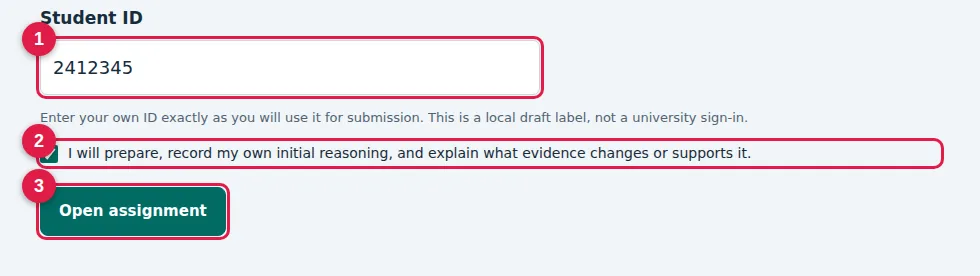
- 1Type your Student IDاكتب رقمك الجامعي
- 2Tick the pledgeضع علامة على التعهد
- 3Open assignmentاضغط Open assignment
Step 3 · Part A: read the case, then FIT
الخطوة 3 · الجزء A: اقرأ الحالة، ثم FIT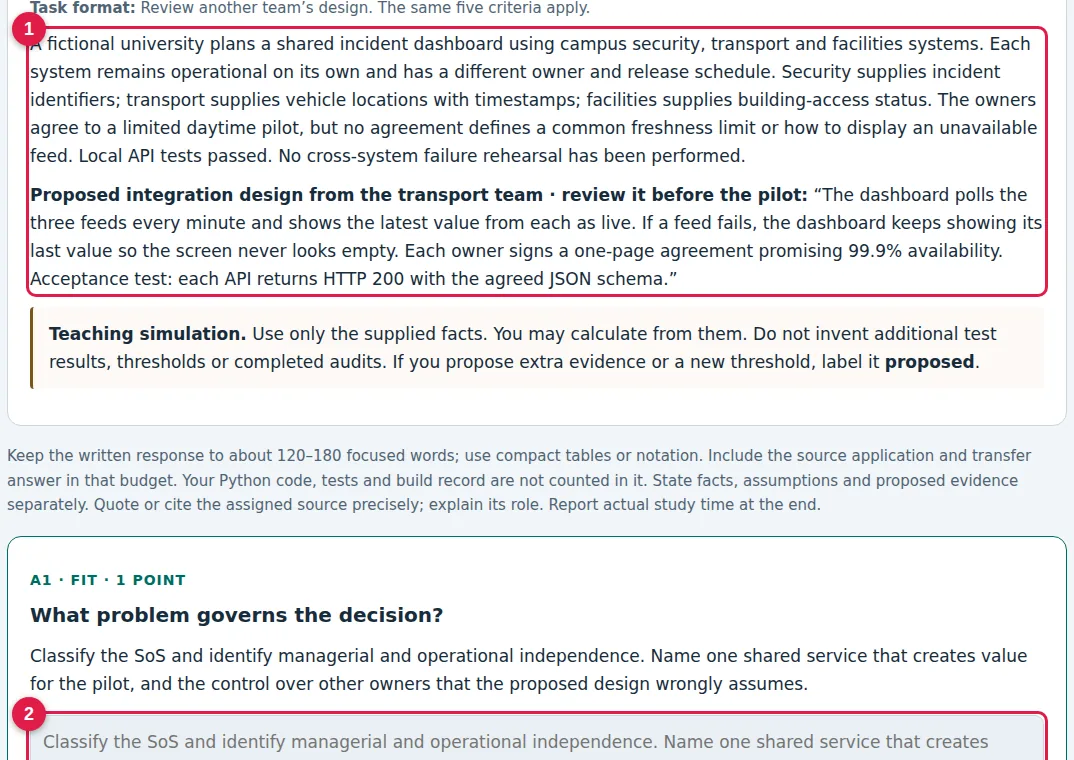
- 1Read the case: only these facts countاقرأ الحالة: الحقائق المكتوبة فقط هي المعتمدة
- 2FIT: the problem that decides the caseFIT: ما المشكلة التي تحكم القرار؟
Step 3 · Part A: the other four fields
الخطوة 3 · الجزء A: بقية الحقول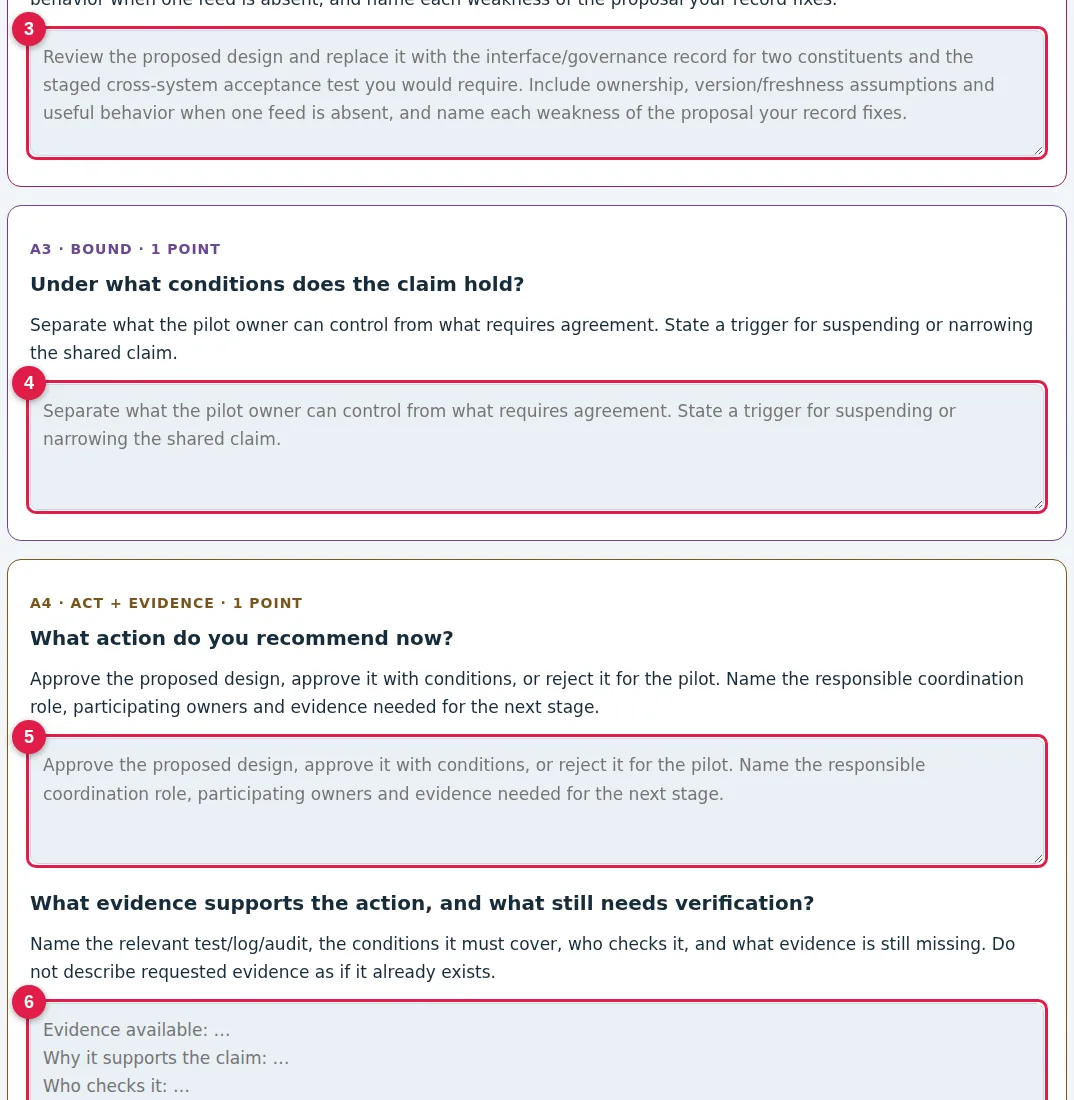
- 3The chapter artifact (TRACE, TEST, …)مهمة الفصل (TRACE أو TEST …)
- 4BOUND: when your claim stops holdingBOUND: متى يتوقف حكمك عن الصحة؟
- 5ACT: what to do now, and who owns itACT: ماذا تفعل الآن ومن المسؤول؟
- 6EVIDENCE: what someone else can checkEVIDENCE: ما الدليل الذي يستطيع غيرك فحصه؟
Step 4 · The Python build
الخطوة 4 · البناء البرمجي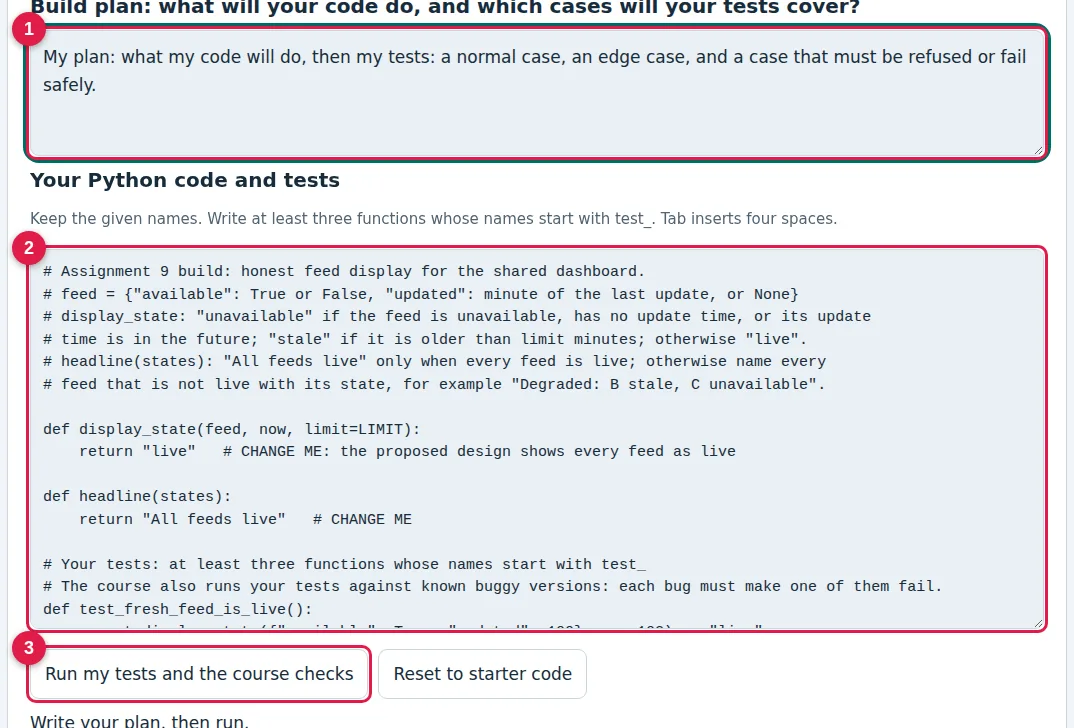
- 1Write a short plan firstاكتب خطة قصيرة أولاً
- 2Complete the code and write 3+ testsأكمل الكود واكتب 3 اختبارات على الأقل
- 3Run my tests and the course checksاضغط Run لتشغيل الاختبارات
Step 4 · Read your build record
الخطوة 4 · اقرأ سجل البناء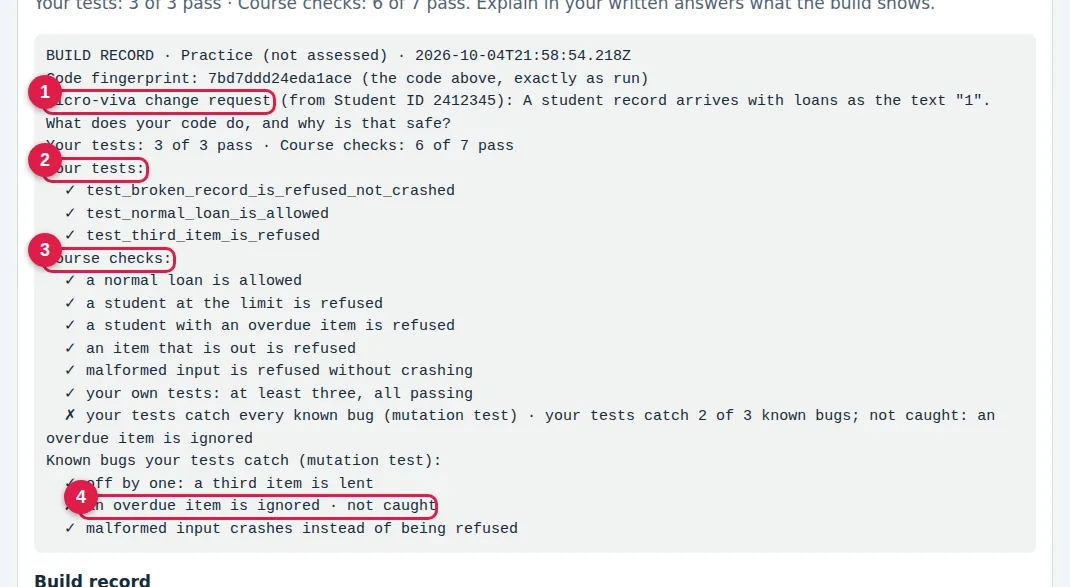
- 1Your micro-viva change requestطلب التعديل الخاص بك للمقابلة القصيرة
- 2Your own tests: ✗ means fix code or testاختباراتك: ✗ تعني أصلح الكود أو الاختبار
- 3Course checks: the rule from the taskفحوصات المقرر: قواعد الواجب
- 4“Not caught”: add a test for this bug«not caught»: أضف اختباراً يكشف هذا الخطأ
Step 5 · Commit Part A
الخطوة 5 · ثبّت الجزء A
- 1Review & commit Part A: freezes Part A, it is not submissionReview & commit يثبّت الجزء A، وهو ليس تسليماً
Step 6 · The new evidence opens on the page
الخطوة 6 · الدليل الجديد يظهر في الصفحة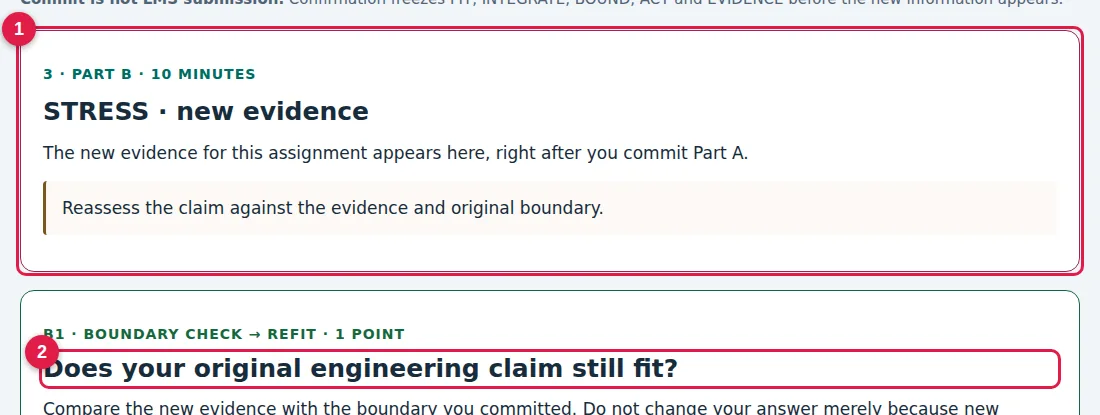
- 1Read the new evidence: it appears right after you commitاقرأ الدليل الجديد: يظهر مباشرة بعد التثبيت
- 2Part B starts here, on the same pageالجزء B يبدأ هنا في نفس الصفحة
Step 7 · Part B: REFIT
الخطوة 7 · الجزء B: المراجعة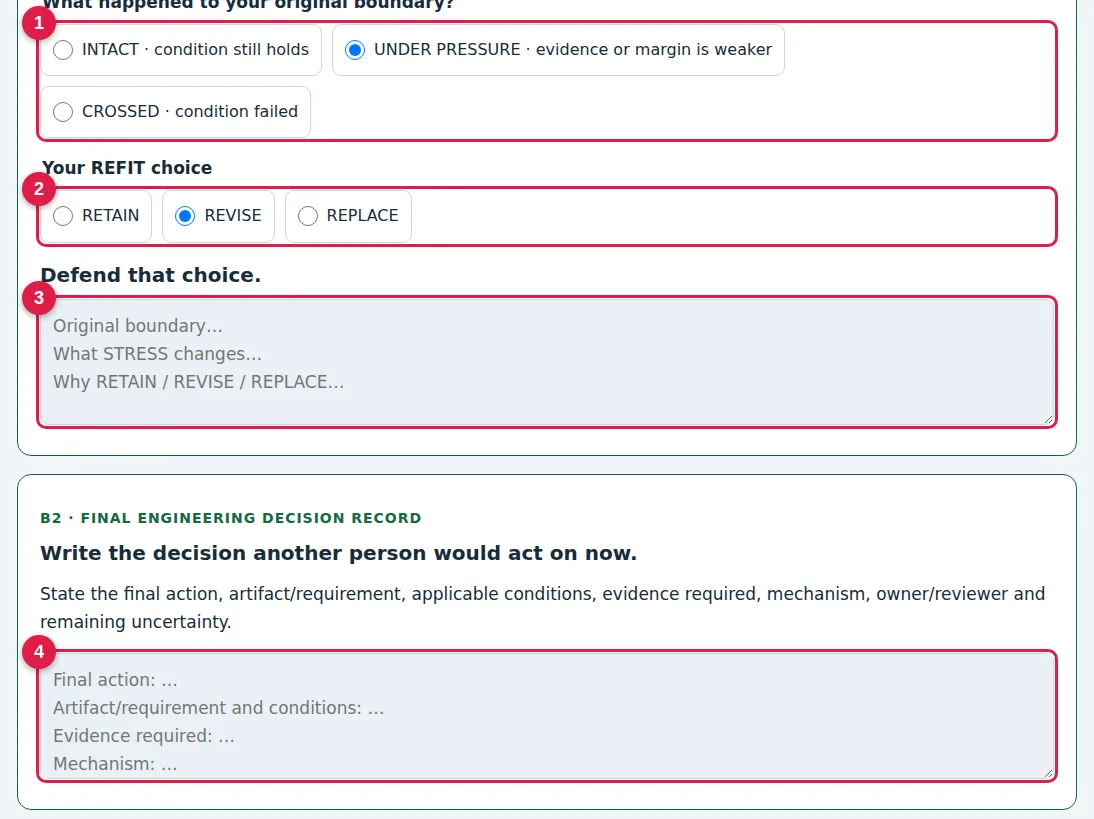
- 1What happened to your boundary?ماذا حدث لحدود حكمك؟
- 2RETAIN, REVISE or REPLACEأبقِ، عدّل، أو استبدل القرار
- 3Defend the choice from the new evidenceبرّر اختيارك من الدليل الجديد
- 4The final decision another person can act onالقرار النهائي الذي ينفّذه غيرك
Step 8 · Declare AI and sign
الخطوة 8 · التصريح والتوقيع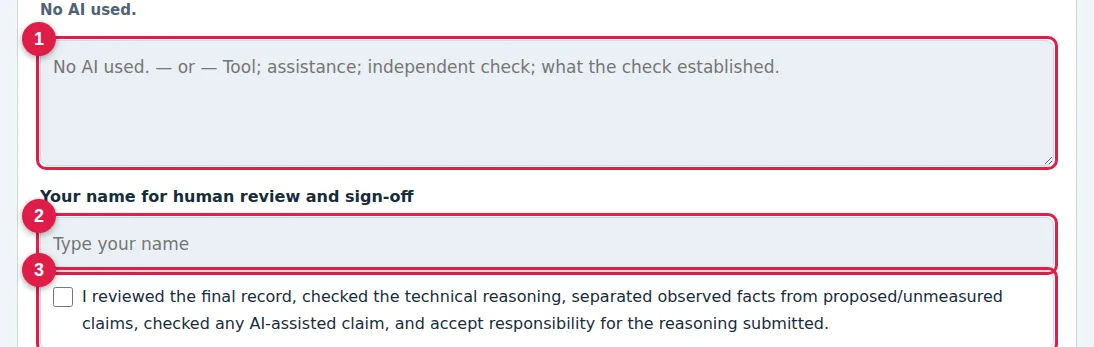
- 1AI use, or “No AI used.”استخدام الذكاء الاصطناعي، أو «No AI used.»
- 2Type your nameاكتب اسمك
- 3Tick: you reviewed it and take responsibilityضع علامة: راجعت العمل وأتحمّل مسؤوليته
Step 9 · Export and submit
الخطوة 9 · صدّر وسلّم
- 4Print / PDF, check the file, upload it in BlackboardPrint / PDF، راجع الملف، ثم ارفعه في Blackboard
Step 9 · In Blackboard: one item
الخطوة 9 · في Blackboard: خانة واحدة فقطUpload your final PDF here, before the deadline. That is all.
ارفع ملف PDF النهائي هنا قبل الموعد. هذا كل شيء.
Text version of the steps · النسخة النصية
- Prepare (15 min). Attend or open the lecture, read the two named source selections, and answer the five practice questions.
- Open the assignment from the learning path with your Student ID. Always use the same browser and the same ID: drafts are saved on your device only.
- Part A, your first judgment (20 min, 120–180 words). Answer the fields: the problem (FIT), the chapter artifact, BOUND, ACT and EVIDENCE, the source concept and the transfer question.
- Python build (30 min). Write a short plan, complete the starter code, write at least three tests, and select Run my tests and the course checks.
- Review & commit Part A. Part A becomes read-only. This is not submission.
- Read the new evidence. It opens on the page right after you commit, and Part B starts below it.
- Part B, REFIT (10 min). Choose the boundary status (INTACT, PRESSURED or CROSSED), choose RETAIN, REVISE or REPLACE, justify it, and write the final decision record.
- Declare AI use and sign. Say which AI you used and what you checked, or write “No AI used.”, then type your name and tick the box.
- Export and submit. Use Print / PDF, check the file, and upload it to the assignment’s single item in Blackboard before the deadline. That is the only upload.
3 · Worked example: Part A مثال محلول
Practice case · fictional, not assessed
A faculty lab lends cameras and sensor kits. The proposed rule: a student may hold at most two items, and may not borrow while any item is overdue. A new self-service kiosk passed tests in which students borrowed one item. The overdue flag is copied from the library system every night at 02:00. No test tried a third item or an overdue student. You advise the lab manager: open the kiosk, open it with restrictions, or hold.
Each card: ✓ a strong answer and ✗ a weak one for the same field. في كل بطاقة: ✓ إجابة قوية، و✗ إجابة ضعيفة تخسر الدرجة. The whole strong Part A is about 160 words.
FIT ما المشكلة التي تحكم القرار؟
The decision depends on whether the kiosk enforces the loan rule on every request. The passed tests show only the allowed path, so they cannot show that a third item or an overdue student is refused.
Security is very important.
Artifact (here TEST) مهمة الفصل: هنا كتابة الاختبارات
T1 0 items, nothing overdue → lent. T2 holds 2, asks for a third → refused, count stays 2. T3 overdue → refused. All three ran in my build; on the real kiosk they are proposed.
Test the system thoroughly.
BOUND متى يتوقف حكمك عن الصحة؟
Holds while the overdue flag is at most 24 hours old and the kiosk is the only way to borrow. Stops if the copy timestamp is older than 24 hours, or staff lend at the counter.
If problems occur.
ACT ماذا تفعل الآن، ومن المسؤول؟
Proposed: open with one item per student until T2 and T3 pass on the real kiosk. Owner: lab manager; reviewer: faculty IT.
Release after testing.
EVIDENCE ما الدليل الذي يستطيع غيرك فحصه؟
My build refuses the third item and the overdue student (all course checks pass, 3 of 3 known bugs caught). Still to verify: the real kiosk and the age of the flag.
The tests passed.
Source + transfer مفهوم من القراءة، وتطبيق مفهوم آخر
Slide [from your assigned reading] · fail-safe defaults · my rule refuses any record it cannot read. Transfer: if the library copy fails, refuse loans that need it.
The textbook says safety matters.
Weak answers lose credit because nothing in them is specific to the case, nothing can be checked, and the boundary cannot be observed. الإجابة الضعيفة عامة، ولا يمكن فحصها، وحدودها غير قابلة للملاحظة.
4 · The Python build: try it here
This practice build works exactly like the one in Assignments 3–9. Try the starter first and read the failures, then complete it. The full example solution is below the build.
PYTHON BUILD · PRACTICE, NOT ASSESSED
Practice build: the loan rule
Write can_borrow(student, item) for the lab-equipment desk, and tests that try to break the rule. Not assessed: use it to learn the build before your first assignment.
Budget about 30 minutes. Python runs in your browser: nothing to install, and nothing is uploaded. The first run downloads Python once (about 10 MB, internet needed). Passing every check is necessary, not sufficient: your written record must use what the build shows.
Your own tests are tested too: the course runs them against known buggy versions of this code, and each bug must make one of your tests fail. Your build record names a micro-viva change request chosen from your Student ID. Be ready to make that change in front of your instructor and explain which tests change and why.
Primary source · about 15 minutes: J. H. Saltzer and M. D. Schroeder, “The Protection of Information in Computer Systems,” Proceedings of the IEEE 63(9), 1975. Read it for the principle “fail-safe defaults”. Which line of can_borrow refuses when it cannot read the input? Use the answer in your build plan.
The course checks your build must pass
- a normal loan is allowed
- a student at the limit is refused
- a student with an overdue item is refused
- an item that is out is refused
- malformed input is refused without crashing
- your own tests: at least three, all passing
- your tests catch every known bug (mutation test)
Keep the given names. Write at least three functions whose names start with test_. Tab inserts four spaces.
Write your plan, then run.
COVERAGE STEP · COURSE OUTCOME 11 · DESIGN AND IMPLEMENT TEST CASES ACROSS TESTING STRATEGIES · PRACTICE
The build record measures which lines and branches of your code your own tests run. The course checks are not counted.
- Make your three tests pass and read the coverage lines in the build record.
- Change one input in one of your tests. Run again: the record shows Run 2.
- Write one sentence: which branch is still not tested, and which input would test it.
A good build plan (2–3 sentences)
Strong
can_borrow refuses unless the item is available, the student holds fewer than LIMIT items and nothing is overdue. Any record it cannot read is refused. Tests: a normal loan, the third item (must be refused), an overdue student (must be refused) and a broken record (refused, not a crash).
Show a complete solution with four tests اعرض حلاً كاملاً مع أربعة اختبارات
def can_borrow(student, item):
    try:
        loans = student["loans"]
        if type(loans) is not int or loans < 0:
            return False
        return item["available"] is True and loans < LIMIT and student["overdue"] is False
    except (KeyError, TypeError):
        return False   # fail-safe default: anything we cannot read is refused

def test_normal_loan_is_allowed():
    assert can_borrow({"id": "s1", "loans": 0, "overdue": False}, {"id": "cam-3", "available": True})

def test_third_item_is_refused():
    assert can_borrow({"id": "s1", "loans": 2, "overdue": False}, {"id": "cam-3", "available": True}) is False

def test_overdue_student_is_refused():
    assert can_borrow({"id": "s1", "loans": 0, "overdue": True}, {"id": "cam-3", "available": True}) is False

def test_broken_record_is_refused_not_crashed():
    assert can_borrow({}, {"id": "cam-3", "available": True}) is False
How to read the build record
- ✓ / ✗ under “Your tests”: your own tests. A ✗ there means your code or your test is wrong. Fix one of them.
- ✓ / ✗ under “Course checks”: the rule from the task. Each ✗ says what failed, for example “a student at the limit must be refused”.
- “Known bugs … not caught”: your tests pass, but they would also pass on a buggy version. Add a test that would fail on that bug. Example: delete
test_overdue_student_is_refusedabove and run again; the record says “not caught: an overdue item is ignored”. - Micro-viva change request: the change you may be asked to make in front of your instructor. Practise it: if you wrote the code yourself, it takes a minute.
- If you cannot fix a failure before the deadline, keep the record and explain the failure honestly in your text. That still earns partial credit; hiding it does not.
5 · New evidence (STRESS) and REFIT
After you commit Part A, the new evidence opens on the page. It is a new fact that tests your boundary. For the practice case, imagine this:
New evidence · practice
The library reports that the nightly copy failed on 3 of the last 30 nights. On those days the overdue flag was up to 48 hours old.
Boundary status
Strong
CROSSED. My boundary said the claim holds while the flag is at most 24 hours old. On 3 nights it was 48 hours old, so an overdue student could have borrowed.
REFIT · RETAIN, REVISE or REPLACE
Strong
REVISE. Keep the restricted opening, and add a fail-safe: when the copy is older than 24 hours, the kiosk refuses loans and sends students to the counter, where staff check the library record by hand.
A well-justified RETAIN earns the same credit as a change. Example: if the evidence had said the copy never failed, RETAIN with that reason is correct.
Final engineering decision record (2–3 sentences)
Strong
Open the kiosk with restrictions (one item per student) once T2 and T3 pass on the real kiosk. When the overdue copy is older than 24 hours, the kiosk refuses and the counter checks by hand. Owner: lab manager; review after 30 days of copy timestamps.
6 · Declare AI use, sign and submit
AI-use declaration · two acceptable examples
“No AI used.”
“ChatGPT: I asked for edge cases for a loan rule. I kept two (third item, broken record) and rejected one (negative loans, already covered). I wrote and ran all code and tests myself.”
AI help is allowed when you declare it. You remain responsible: in the micro-viva you must explain and change your own code.
- Type your name for human review and tick the attestation.
- Select Print / PDF (or Download final editable .md if asked), and open the file to check it.
- Submit the final file in Blackboard before the deadline. Exporting on the site is not submission.
7 · Assignments 6–9: three new things الواجبات 6–9: ثلاثة أشياء جديدة
Same steps, same 5 points. The examples use the practice case, not your assignments. نفس الخطوات ونفس الدرجة. الأمثلة على الحالة التدريبية وليست على واجباتك.
A · What AI may do in each step أ · دور الذكاء الاصطناعي في كل خطوة
| Step · الخطوة | What AI may do · دور الذكاء الاصطناعي |
|---|---|
| Studying the lecture before you start قبل البدء: مذاكرة المحاضرة | AI-Assisted · for learning: AI may explain an idea and ask you to restate it in your own words. It may not answer this case. بمساعدة الذكاء الاصطناعي · للتعلّم: يمكن للذكاء الاصطناعي أن يشرح فكرة ويطلب منك إعادة صياغتها بكلامك، ولا يجيب عن حالة هذا الواجب. |
| Part A answers (FIT, COMPARE, BOUND, ACT + EVIDENCE, reading, second idea) إجابات الجزء A | AI-Free: No AI. Write them yourself. بدون ذكاء اصطناعي: بدون ذكاء اصطناعي. اكتبها بنفسك. |
| The AI draft in the scenario مسودة الذكاء الاصطناعي في الحالة | AI-Free: It is the material you critique. Find the claims the supplied facts do not support. بدون ذكاء اصطناعي: هي المادة التي تنقدها: حدّد الادعاءات التي لا تدعمها الحقائق المعطاة. |
| Python build البناء في بايثون | AI-Assisted: AI may explain an error message. It may not write your functions or your tests. بمساعدة الذكاء الاصطناعي: يمكن للذكاء الاصطناعي أن يشرح رسالة الخطأ، ولا يكتب دوالك ولا اختباراتك. |
| After you commit (STRESS and REFIT) بعد تثبيت الجزء A | AI-Assisted: AI may question your reasoning. The final decision and the words are yours. بمساعدة الذكاء الاصطناعي: يمكن للذكاء الاصطناعي أن يسألك عن تفكيرك، والقرار الأخير وصياغته لك. |
| AI-use declaration تصريح استخدام الذكاء الاصطناعي | Required: Name the tool and the steps where you used it, what you changed because of it, and what you chose not to take, and why. مطلوب: اذكر الأداة والخطوات التي استخدمتها فيها، وما غيّرته بسببها، وما رفضت أخذه ولماذا. |
✓ “My build says KeyError: 'loans'. What does this error mean?” Then you fix it. ✗ “Write reserve_minutes and three tests for it.”
B · Critique the AI draft ب · انقد مسودة الذكاء الاصطناعي
For each claim in the draft: find the supplied fact that supports it, contradicts it, or says nothing, and write your verdict. This counts inside FIT; then write your own answer.
لكل ادعاء في المسودة: ابحث عن الحقيقة المعطاة التي تدعمه أو تنقضه، واكتب حكمك. هذا جزء من FIT، ثم اكتب إجابتك أنت.
Practice AI draft · not assessed
“Open the kiosk now. It passed every test, so the loan rule works. The overdue flag comes from the library system, so it is always correct. A student can never take a third item, because the rule says at most two.”
Show a strong critique اعرض نقداً قوياً
- “It passed every test, so the loan rule works.” Not supported. The tests only borrowed one item; no test tried a third item or an overdue student.
- “The overdue flag is always correct.” Not supported. The flag is copied once a night at 02:00, so it can be almost a day old.
- “A student can never take a third item.” Not supported. Writing the rule is not the same as enforcing it, and nothing has tested the third item.
✗ Weak: “The AI draft is too confident and wrong.” It names no claim and no fact.
C · The in-class check ج · التحقق في المحاضرة
In-class check · AI-Free. In the lecture after the deadline you answer two short questions on paper, with no devices, about your own submission: a small change to your code (which test fails, and why) and one new fact (does your decision change?). It takes about 10 minutes. Both answers correct: your assignment mark stands. One correct: your mark is halved. Neither: a two-minute conversation with the instructor decides the mark. If you miss that lecture with an accepted excuse, the check is done in office hours. This applies the ownership rule on every assignment: your written work and your own explanation must agree.
التحقق في المحاضرة · بدون ذكاء اصطناعي. في المحاضرة التي تلي موعد التسليم تجيب على ورق، وبدون أي جهاز، عن سؤالين قصيرين حول واجبك أنت: تغيير صغير في الكود (أي اختبار سيفشل ولماذا)، ومعلومة جديدة (هل يتغير قرارك؟). يستغرق نحو 10 دقائق. إذا كانت الإجابتان صحيحتين تبقى درجة الواجب كما هي، وإذا كانت إجابة واحدة صحيحة تصبح نصف الدرجة، وإذا لم تصح أي منهما تُحدَّد الدرجة بعد نقاش قصير مع الأستاذ مدته دقيقتان. ومن غاب عن تلك المحاضرة بعذر مقبول يُجري التحقق في الساعات المكتبية. هذا تطبيق لقاعدة الملكية الموجودة في كل واجب: يجب أن يتفق ما كتبته مع شرحك له.
Two sample questions on the practice build. Answer first, then open:
1 · Change loans < LIMIT to loans <= LIMIT. Which test fails, and why? السؤال 1 · تغيير صغير في الكود
✓ test_third_item_is_refused fails: a student who already holds 2 items is now lent a third. The other three tests still pass, because none of them holds 2 items.
✗ “All the tests fail because the code is wrong.”
2 · The library now copies the overdue flag every hour. Does your decision change? السؤال 2 · معلومة جديدة
✓ RETAIN. My boundary (flag at most 24 hours old) now holds more strongly, but T2 and T3 have still not run on the real kiosk, so I keep the restricted opening until they pass.
✗ “Yes, now it is safe, so open the kiosk.”
Prepare: read your submission once more, run your tests and know which test catches which bug, and say your BOUND in one sentence. Declare: name the tool, the steps, what you changed and what you rejected, or write “No AI used.”
استعد: اقرأ ما سلّمته، وشغّل اختباراتك واعرف أي اختبار يكشف أي خطأ، وقل حدود قرارك في جملة. صرّح: اذكر الأداة والخطوات وما غيّرته وما رفضته، أو اكتب “No AI used.”
8 · Questions students ask أسئلة الطلاب
Is “Review & commit Part A” my submission? هل Review & commit هو التسليم؟ لا.
No. It freezes Part A. You submit the final PDF in Blackboard at the end.
Can I change Part A after committing? هل أعدّل الجزء A بعد التثبيت؟ لا، عدّل في الجزء B.
No. Use Part B (REFIT) to revise your decision. That is the point of the method.
I opened the assignment on another computer and my draft is gone. فتحت من جهاز آخر واختفت مسودتي.
Drafts stay in the browser where you wrote them. Go back to that browser, or use Download draft / backup before you switch.
Python does not load. بايثون لا يعمل.
The first run downloads Python once (about 10 MB), so you need internet. Use a current Chrome, Edge, Firefox or Safari on a laptop, and try again.
A course check fails and I cannot fix it. فحص لا ينجح ولا أعرف إصلاحه.
Keep the record and explain the failure in your text. An honest explanation earns partial credit.
It says a known bug is “not caught”. يظهر لي «not caught».
Your tests are too easy. Add a test that a buggy version would fail. The bug's name tells you what to test.
What do I upload to Blackboard, and when? ماذا أرفع في Blackboard ومتى؟ ملف PDF النهائي فقط، مرة واحدة.
Only the final PDF, once, to the assignment’s item in Blackboard, before the deadline. You do not upload Part A separately.
How many words? كم كلمة؟ 120–180، والكود لا يُحسب.
About 120–180 for the written answers. Code, tests and the build record are not counted.
Can I use ChatGPT or another AI? هل أستخدم ChatGPT؟ نعم، مع التصريح.
Yes, if you declare it and check its output. If you cannot explain or change your own code in the micro-viva, the build loses its credit. In Assignments 6–9, Part A is written without AI: see what AI may do in each step. The course follows the FCIT Generative AI Policy, Option C (Mixed Approach): the AI level of every assessment is listed in the course specification. The examinations and the in-class check are AI-Free.
What is the micro-viva? ما المقابلة القصيرة؟ دقيقتان تشرح فيهما عملك.
A two-minute conversation with a few students per section. You explain your work and make the change request named in your build record.
Where do I ask for help? أين أسأل؟ في الكلاس أو الساعات المكتبية أو البريد.
In class, in office hours, or by email to the instructor, with your Student ID and the assignment number.